
Object Browser accidentally undocked, now I can't get it to re-dock

I don't know what I did to undock it. It used to appear as a tab on the left side of my window, with the "Files" and "Window List".

I have tried dragging the Object Browser to the left side of PL/SQL Developer window, but it will not dock. It just floats off outside of the PL/SQL Developer window.
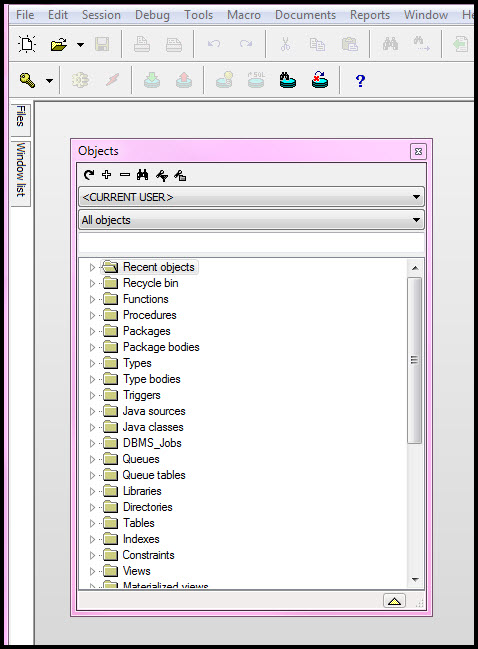
objectbrowser.jpg
 
You could try closing PL/SQL Developer, reopen it and see if it is docked. Depending on your preferences, it might do that.

If not, I monkeyed with mine a bit. It looks like if you open your files and windows list, then "pin" it (Click the icon that looks like a tack), they will stay put.

After they are pinned, you can move your Objects window and it will outline where it will dock.
 
All docking areas are unpinned in this picture, so first you will need to pin the docking area where you want to dock the Object Browser. Click on "Files" or "Window list" and subsequently on the "Pin/Unpin" button. Now you can move the Object Browser to the desired position in the pinned docking area. Click on the "Pin/Unpin" button again to unpin the docking area.
 
Back
Top