
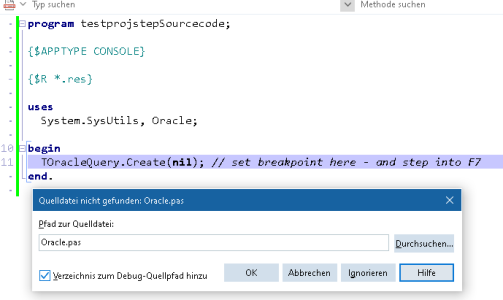
In Delphi 13 (37.0.57242.3601), when there is a (legitimate) exception by DOA, such as "invalid username", the debugger tries to load 'Oracle.pas' to show the source lines.
However, when you click ignore, it then shows the CPU View, in "unknown file". This is not helpful and annoying, because from there on the "instruction next step F7/F8" are pretty much useleyy.
Previously in Delphi 10, it showed the next "useful source line" in the Debugger, i.e.
We would like to keep using DOA in 'Binary' form, that is without the source option (because it might be the most important - but not the only 3rd party extension and not everyone has source available).
Does anyone know a setting how to "debug step into next useful source line" for D13?
Edited to add: yes, you can then do SHIFT-F7 which will step into the "next line with source code". Anyone knows how to make that permanent?
As a minimal reproducer: Start a blank project (new console application)
However, when you click ignore, it then shows the CPU View, in "unknown file". This is not helpful and annoying, because from there on the "instruction next step F7/F8" are pretty much useleyy.
Previously in Delphi 10, it showed the next "useful source line" in the Debugger, i.e.
Code:
System._ClassCreate... System.pas:17494We would like to keep using DOA in 'Binary' form, that is without the source option (because it might be the most important - but not the only 3rd party extension and not everyone has source available).
Does anyone know a setting how to "debug step into next useful source line" for D13?
Edited to add: yes, you can then do SHIFT-F7 which will step into the "next line with source code". Anyone knows how to make that permanent?
As a minimal reproducer: Start a blank project (new console application)
Code:
program Project1;

{$APPTYPE CONSOLE}

{$R *.res}

uses
  System.SysUtils, Oracle;

begin
  TOracleQuery.Create(nil); // set breakpoint here - and step into F7
end.
Attachments
Last edited: